
Scylla TextMode turns the screen into a character grid, so you can build a roguelike, an in-game terminal, or a retro interface without fighting a text layout engine that was never meant for it.
Summary
Scylla TextMode is the framework’s character-grid renderer. It treats the screen the way a terminal does, as a fixed lattice of cells that each hold one character, a foreground color, a background color, and a handful of style bits, and it draws that lattice on the GPU in a single instanced pass. If your game’s screen is made of characters rather than sprites, this is the layer you build it on.
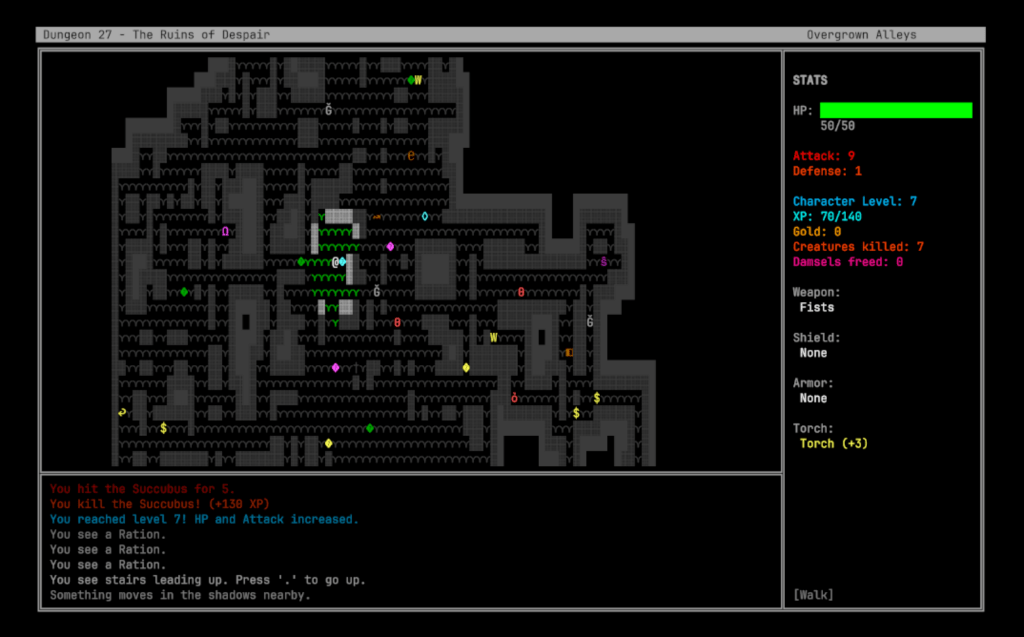
That covers more ground than it first sounds like. Roguelikes are the obvious case, and TextMode ships a full one as a demo. But the same grid is what you want for an in-game terminal the player types into, a diegetic computer console on a spaceship wall, an ASCII art title sequence, a debug overlay that has to stay legible at any resolution, or a deliberately retro interface that wants the look of a text mode display without emulating one byte for byte.
TextMode renders text using signed distance fields. Glyphs come from a TextMeshPro font atlas, so text stays crisp at any resolution and any zoom level rather than turning into a blur or a staircase the way a bitmap font would, and the whole grid draws in one RenderMeshIndirect call regardless of how many cells changed. Cells upload as a dirty range, so writing one character costs one small buffer update rather than a full re-upload.
On top of the grid sit the parts that make it a usable text display rather than a character buffer: a drawing API with boxes, wrapping and blending, a VT/ANSI terminal emulator complete enough to run escape sequences from real programs, a text effects library for reveals and transitions, and a color theme system that repaints a whole screen from one call. The module depends on Scylla Core and nothing else, and it initializes at Tier 1 so it is ready before any gameplay module that wants to draw with it.
Use Scylla TextMode for:
- Roguelikes and other games where the map, the entities and the UI are all characters on a grid.
- In-game terminals the player types into, from a simple command prompt to something running real escape sequences.
- Diegetic computer screens, ship consoles, security monitors, and other in-world displays.
- ASCII art title screens, intros, and cutscenes, with typewriter reveals and screen transitions.
- Debug overlays and developer consoles that need to stay readable at any resolution.
- Retro-styled interfaces where the character-cell look is the point.
Features
TextMode is layered: the grid and its renderer at the bottom, then drawing, then the terminal and the presentation systems on top. You can use as much of the stack as your game needs and ignore the rest.
- Character grid. A
CellGridof up to 512 by 512 cells, capped at 131,072 cells total. EachCellis a 32-byte struct laid out to map directly onto the GPU buffer, holding a Unicode codepoint, packed foreground and background colors, style attributes, and the glyph’s atlas coordinates. See Views and Grid. - SDF (Signed Distance Field) rendering. Glyphs are sampled from a TextMeshPro font atlas and drawn with a distance field, so text stays sharp at any size or resolution. The whole grid renders in one instanced indirect draw, and only the cells you changed are uploaded. See Views and Grid.
- Two view components.
TextModeViewplaces the grid in world space, which is what you want for a monitor on a wall or a screen the camera can approach.UITextModeViewis a Canvas graphic that honors masking,RectMask2Dclipping andCanvasGroupalpha, which is what you want for an overlay. See Views and Grid. - Drawing API.
TextModeConsolegives you the operations a text display actually needs: printing with alignment and word or character wrapping, single character writes, region fills and clears, box drawing in five styles, horizontal and vertical rules, and grid-to-grid blitting with alpha. See Drawing. - Full ANSI color. The standard sixteen, the 256-color extended palette (a 216-color cube plus 24 grays), and 24-bit truecolor, alongside nine cell attributes including bold, italic, underline, inverse, dim and blink. Backgrounds compose through eight blend modes. See Colors and Attributes.
- VT/ANSI terminal emulation. A byte-level parser built on Paul Williams’ DEC-compatible state machine, feeding an emulator that handles cursor movement, SGR (Select Graphic Rendition) color and style, scrolling regions, the alternate screen buffer, insert and delete, tab stops, and bracketed paste. UTF-8 arrives a byte at a time and split sequences survive the gap. See Terminal.
- Terminal frontend.
TextModeTerminalwraps the emulator into something you can drop in a scene: a log mode with scrollback for output, a full-screen mode for programs that drive the whole display, an optional command line with history and autocompletion, and key-to-escape-sequence encoding for arrows, function keys and modifiers. See Terminal Frontend. - Text effects. A library of effects that animate cells over time: typewriter and decode reveals, wipes, dissolves, irises and other mask-ordered transitions, digital rain and static tune-in set pieces, and ambient pulse, flicker, wave, glitch and twinkle. Effects compose through a sequencer and are authorable as preset assets. See Text Effects.
- Color themes. A theme is a named Core color palette, so switching one call repaints every view, retints content already on the grid, and moves the ANSI table with it. Eight themes ship (Classic, Green Phosphor, Amber Phosphor, Lightman, Midnight, Paper, WordPerfect and Amiga) and a project can add its own by dropping in a palette asset. See Color Themes.
- Selection and mouse reporting. Click-and-drag text selection with clipboard copy, plus terminal mouse reporting in the normal, button-event and any-event tracking modes with both default and SGR encoding, so a program running in the terminal can read the mouse. See Selection and Mouse.
- Debug console display. A bridge assembly that renders the Scylla Console module through a TextMode view, so the in-game developer console gets the same crisp SDF text and the same terminal behavior as everything else. See Console Display.
- CRT display. A simulated cathode ray tube for a view: even scanlines, phosphor masks, afterglow, glow and an optional curved screen, with nine monitor presets and three quality tiers. It works in every render pipeline, and selection and mouse input follow the curved picture. See CRT Display.
- Configuration. A
ScyllaTextModeConfigurationasset covering the grid, SDF, terminal, effects and theme settings, mirrored to a JSON config file with the framework’s four-tier fallback so a shipped game can be retuned without a rebuild. See Configuration.
Architecture
The stack is a grid at the bottom and progressively more opinionated layers on top. Nothing above the grid is mandatory: a game that only wants to draw characters uses the console and stops there.
flowchart TB
    subgraph Scene
        BS[ScyllaBootstrap]
        TM[ScyllaTextMode<br/>module]
        BS --- TM
    end
    subgraph Presentation
        TV[TextModeView<br/>world space]
        UV[UITextModeView<br/>canvas]
    end
    subgraph Data
        CG[CellGrid<br/>cells + dirty range]
        GA[GlyphAtlasCache<br/>TMP SDF atlas]
    end
    subgraph Layers [Optional layers]
        TC[TextModeConsole<br/>drawing API]
        TE[TerminalEmulator<br/>VT/ANSI]
        FX[Effects player]
        TH[Color themes]
    end
    TV --> CG
    UV --> CG
    CG --> GA
    TC --> CG
    TE --> CG
    FX --> CG
    TH --> TV
    TH --> UV
A view owns a CellGrid and a GlyphAtlasCache, and uploads dirty cells to the GPU in LateUpdate. Everything that draws does so by writing cells into that grid, whether that is your own code through TextModeConsole, the terminal emulator interpreting a byte stream, or an effect animating a region. Because they all share one destination, an effect can animate text the terminal wrote, and a theme change repaints everything on the grid regardless of what put it there.
Where to start
If you have not used the module before, Getting Started puts a grid on screen and prints to it in a few minutes. From there:
- Building a roguelike or any game that draws its own screen: Views and Grid, then Drawing.
- Building an in-game terminal or command prompt: Terminal Frontend.
- Running real escape sequences from a program or a remote host: Terminal.
- Making a title screen or an intro look alive: Text Effects.
- Letting players restyle the display: Color Themes.
- Giving the display the look of an old monitor: CRT Display.
Reference
- Changelog. What shipped in each release, newest first.
Related
- 02 TextMode – Getting Started
- 03 TextMode – Views and Grid
- 04 TextMode – Drawing
- 05 TextMode – Colors and Attributes
- 06 TextMode – Terminal Emulation
- 07 TextMode – Terminal Frontend
- 08 TextMode – Text Effects
- 09 TextMode – Color Themes
- 10 TextMode – Selection and Mouse
- 11 TextMode – Console Display
- 12 TextMode – Configuration
- 13 TextMode – Changelog
- API reference:
Scylla.TextMode.ScyllaTextMode - API reference:
Scylla.TextMode.TextModeConsole - API reference:
Scylla.TextMode.CellGrid - API reference:
Scylla.TextMode.TextModeView - API reference:
Scylla.TextMode.UITextModeView - API reference:
Scylla.TextMode.TerminalEmulator - API reference:
Scylla.TextMode.ScyllaTextModeConfiguration